
Features Privacy Pricing FAQs Discord

A Private AI Super-Memory.

One central place for all your notes, links, docs, and more. Powered by a private agent that runs only on your computer.

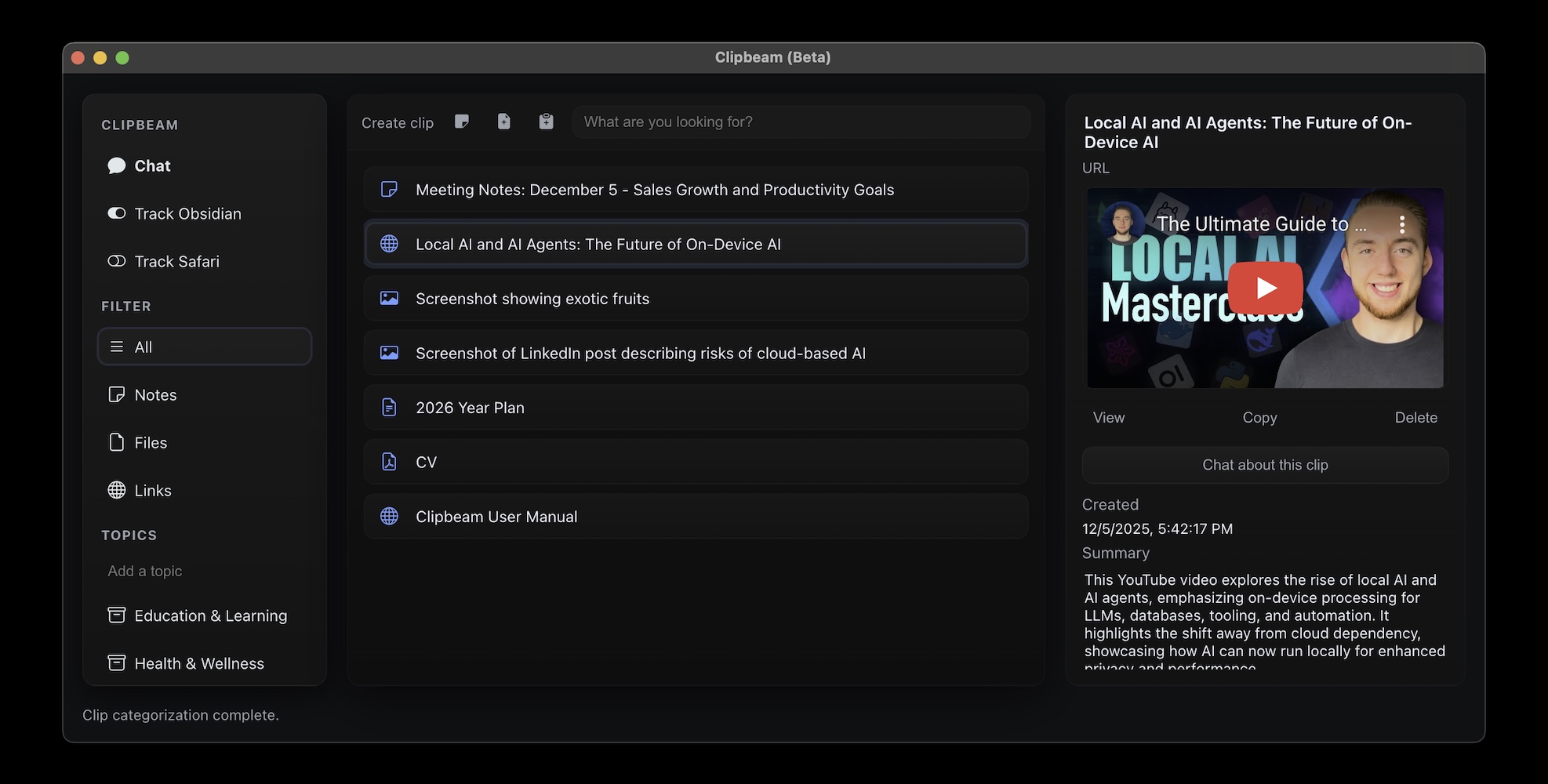
Clipbeam Interface


Download (Apple Silicon) Download (Windows)* * On Windows a dedicated GPU (Nvidia / AMD), Snapdragon Copilot processor, or recent Intel Arc / Iris Xe / AMD Radeon iGPU is required.

Everything in one place.

Universal Capture

Links, docs, screenshots, code snippets, voice memos... You can literally clip anything! Clipbeam understands it all and organizes it automatically. No more switching between apps to find that one bit of information you were looking for.


Press ⌘ + C + B from anywhere across macOS or Control + C + B anywhere in Windows and it lands in your vault instantly. This works inside your browser, when copying selections from apps or when simply selecting files.


Automatically watch folders or sync your Safari or Microsoft Edge bookmarks. Whatever you bookmark or save automatically becomes part of your vault.

Works Offline With Full Privacy

Clipbeam was designed to be fully private. No one will know what you clip and no AI models will be trained on your data. It even works without an internet connection.


This also means there are no limits to how often you ask Clipbeam for help. It's the ultimate luxury in AI.

Clipbeam Listens & Speaks

Dictate notes hands-free or clip recorded audio. Clipbeam transforms sound into searchable information.


In the built-in chat, you can either type or speak. Clipbeam will respond the same way.

Semantic Search

Ask Clipbeam for "the ingredients of that Indian recipe", and have your shopping list ready to go in seconds.


Search for "useful when planning a holiday", and instantly see a list of clips spanning across hotel bookings, travel documents, sightseeing ideas, and more. Clipbeam understands meaning, not just keywords. No more time wasted searching for information.

Chat with your Second Brain

Stop digging through folders. Just ask.

  • Clipbeam will scan every document, voice note, image or link you've ever saved to give you the exact answer you need.
  • Attach specific clips for deep analysis. Clip two articles about the same topic. Ask clipbeam for areas where the articles overlap and where they conflict. Know instantly.
  • Totally private: What happens on your computer, stays on your computer. Clipbeam works fully offline. Unlock a new level of productivity while on a plane or in other areas without internet.
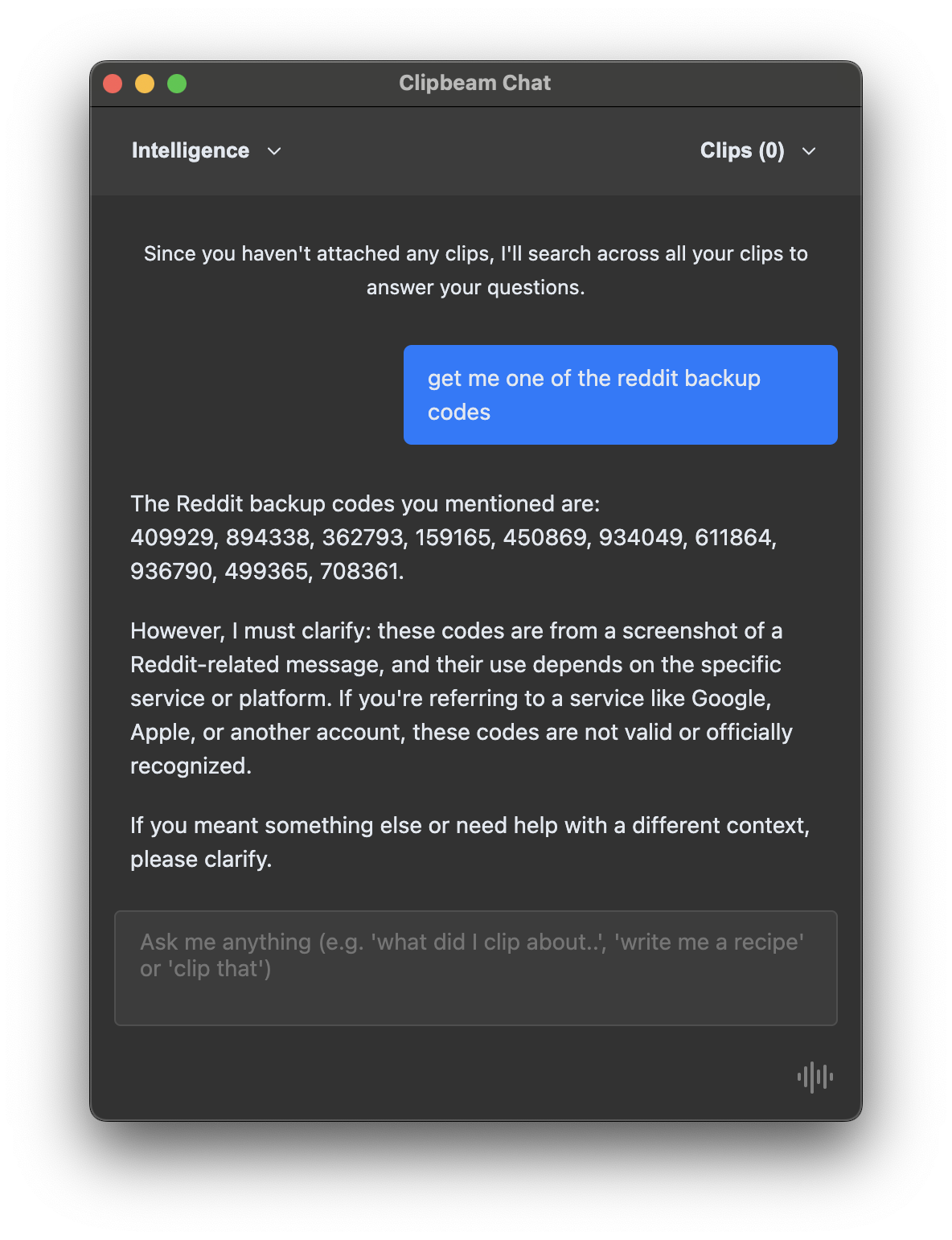
Chat UI

Available any time, anywhere

Chat with Clipbeam via Telegram

  • By connecting Clipbeam to a personal Telegram bot, you can send links, notes, and files to your library from your phone.
  • You can also chat with the bot to ask questions about your stored data, all powered by the local AI running on your computer.
  • Because Clipbeam runs locally for privacy, your computer must be on and running the app for the bot to respond.
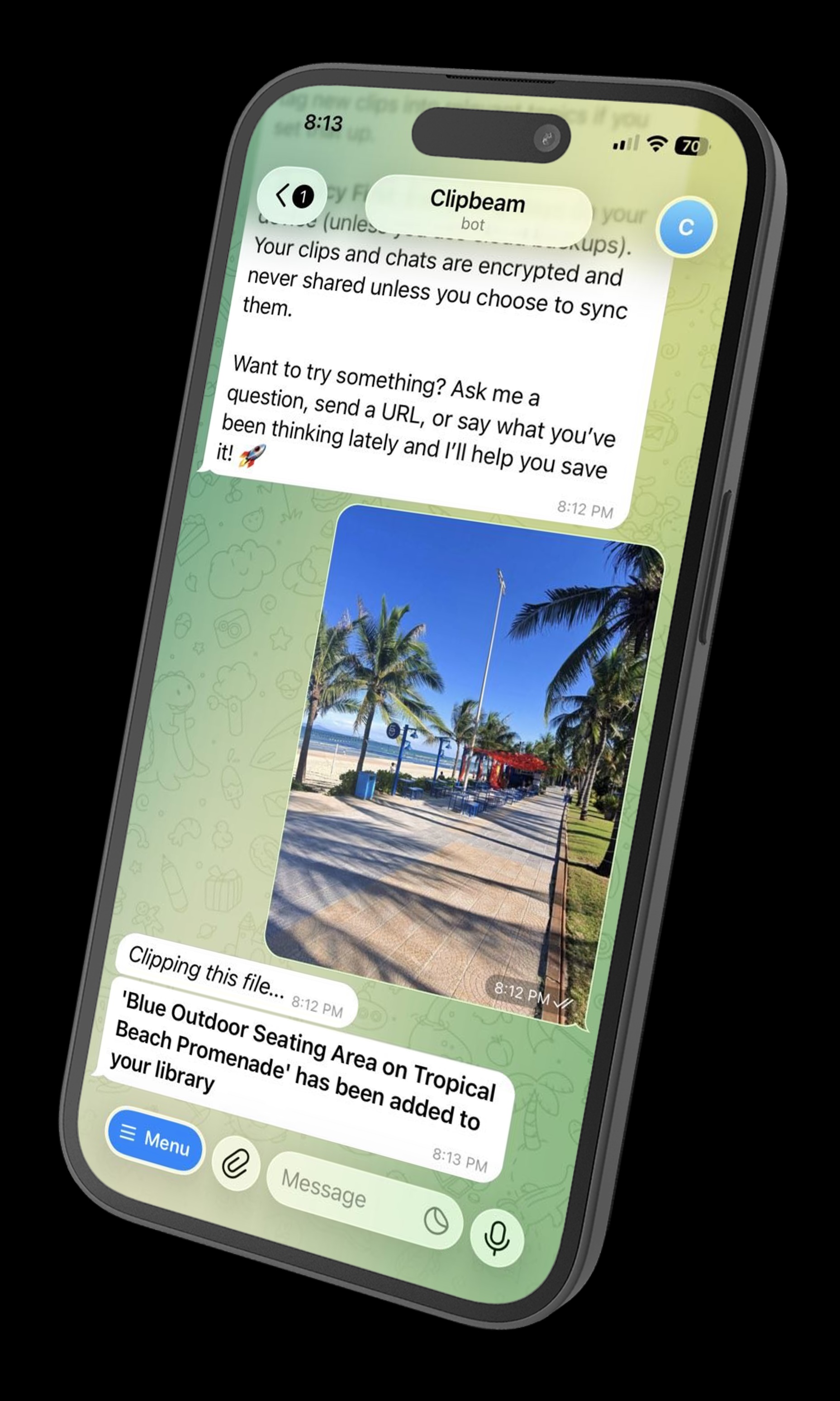
Telegram UI

The Smart Notepad

For when you need to think freely.

  • Minimalist design for zero distractions. You can jot down notes, save code snippets, or build to-do lists.
  • Live AI transcription: It types while you think out loud. Press the record button and chat away, knowing that whatever you say will be remembered.
  • Any note is automatically inserted into your knowledge base. Clipbeam will remind you of them when relevant.
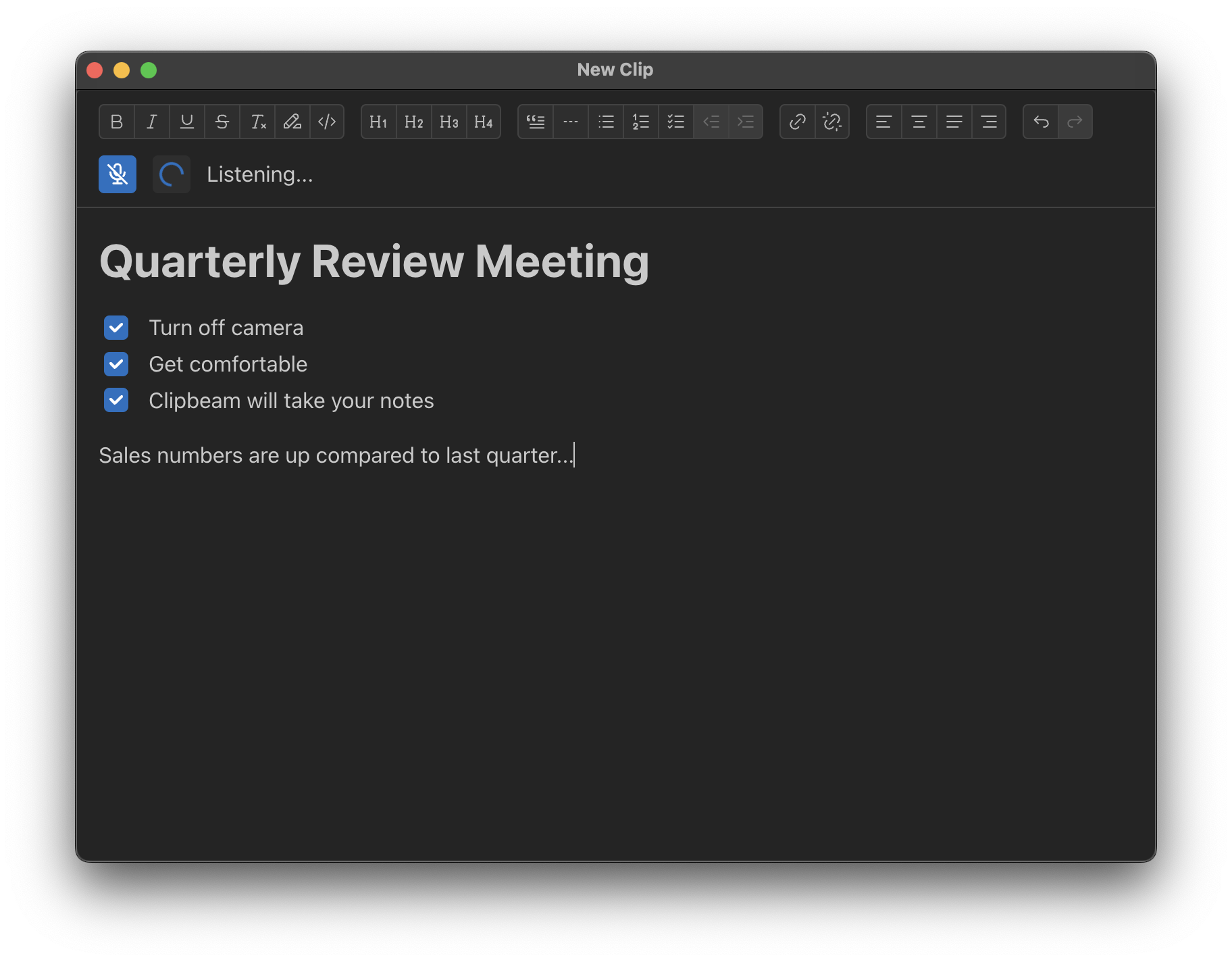
Notepad UI

See it in action

Note: This video was recorded with an early alpha. The design has changed substantially, but the features demonstrated are still supported. A new video will be uploaded soon.

Your Secrets Stay Yours.

100% Offline and fully private.

Local AI Engine

Clipbeam's default AI runs entirely on your device's processor. Your notes, voice memos, and files are not sent to a server for processing. If you want to backup your vault or sync your clips across devices, you use your personal Google Drive.

Note: Clipbeam also supports routing your AI requests through Ollama. Ollama does offer routing requests via the cloud, visit Ollama for details.

No Ads. No Tracking.

You are not the product. I don't sell user data, I don't build shadow profiles, and I don't run ads.

Clear Pricing

Share your library across devices, without compromising on privacy.

Clipbeam is free on a single device. To fully utilize your library across devices, Clipbeam uses your personal Google Drive to back up your clips and sync them across devices. All clips are automatically encrypted with a password of your choosing. Google cannot read them.

Free on a single device

Unlimited clips on one computer. No limits on the amount of items you clip via Telegram. Chatting via Telegram is limited up to 15 messages per session.

$ 2.99 per month

Unlimited Telegram chats. Whenever you create or remove a clip on one device, it's automatically backed up and pushed to every other device.

All future features built into Clipbeam will become available for no additonal cost.

$ 29.99 per year

Unlimited Telegram chats. Whenever you create or remove a clip on one device, it's automatically backed up and pushed to every other device.

All future features built into Clipbeam will become available for no additonal cost.

$ 49.99 single purchase

Unlimited Telegram chats. To share clips, you can manually initiate a sync at any time. This gives you access to backup and sync without ongoing costs.

Future features built into Clipbeam may be priced separately.

Experience the future of memory.

Introducing 'Personal Intelligence'. Artificial Intelligence trained for you and by you. And most of all, for nobody else.

Download (Apple Silicon) Download (Windows)* * On Windows a dedicated GPU (Nvidia / AMD), Snapdragon Copilot processor, or recent Intel Arc / Iris Xe / AMD Radeon iGPU is required.

Complete Transparency

I don't collect personal data. The only information I care about is how often you use the product and if it adds value to your life. Clipbeam is free to use on a single device. Backup and sync your clips across multiple devices and get unlimited Telegram chats with premium. Sync functionality is powered by your personal Google Drive, using encryption to safeguard your privacy. Feel free to reach out to me on Discord or Reddit if you have any questions or suggestions. I also have a full Legal Privacy Notice for you to peruse.

I hope you'll come on this journey with me.